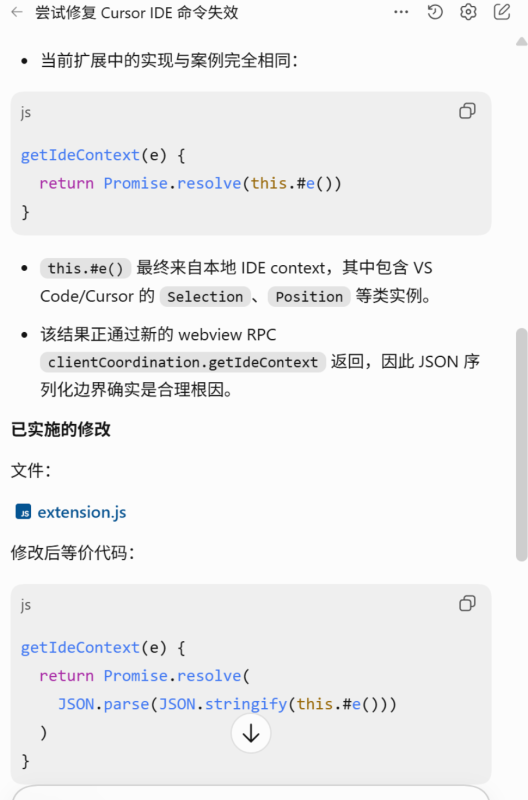


先说结论,用下列提示词让codex修复:
请你看看这个解决方案能不能尝试解决cursor ide命令不生效的问题:
Related but distinct VS Code extension regression on Windows
I am seeing a related IDE-context failure, but in my case the regression occurs inside the VS Code extension itself rather than only in the Codex CLI.

Environment:

Windows x64
VS Code 1.131.0
OpenAI Codex extension 26.727.40816
Last known working extension build: 26.707.91948
Behavior:

Open a workspace in VS Code.
Open the Codex extension.
Enable /ide-context.
The IDE context indicator appears briefly and initially shows the active/open files.
It then automatically disappears and IDE context is disabled again.
Subsequent messages no longer receive the active file or open-tab context.
The extension itself activates successfully, authentication succeeds, and the app server starts normally. The relevant extension log contains:

[Composer] failed to fetch ide-context error={}
Investigation
The current webview calls clientCoordination.getIdeContext. The VS Code extension implementation forwards the result of getLocalIdeContext() directly through the new webview RPC path:

getIdeContext(e) {
return Promise.resolve(this.#e());
}

The returned IDE context contains VS Code objects such as Selection and Position.
Normalizing the result into plain JSON-serializable data before returning it fixes the problem:

getIdeContext(e) {

return Promise.resolve(this.#e());
return Promise.resolve(
JSON.parse(JSON.stringify(this.#e()))
);
}
I applied this as a reversible runtime wrapper without modifying the official extension.js. After reloading VS Code, /ide-context remains enabled and consistently reports the active file and open tabs.
This appears to be a serialization regression in the new webview RPC/client-coordination path rather than an extension activation, authentication, or workspace-detection problem.
来源于github:openai/codex/issues/24514最后一条评论
![图片[1]-解决cursor中codex插件/ide context命令不生效的问题-MacFun is an interesting website.](https://www.macfun.org/wp-content/uploads/2026/08/image-676x1024.png)
最后关闭,重新打开cursor即可,如果没显示这个按钮,/ide一下即可解决
© 版权声明
文章版权归作者所有,未经允许请勿转载。
THE END



暂无评论内容